Part III:大型語言模型實作高階班(LangChain, RAG, Fine-tuning)
📑 目錄
Part III:大型語言模型實作高階班 (LangChain, RAG, Fine-tuning)
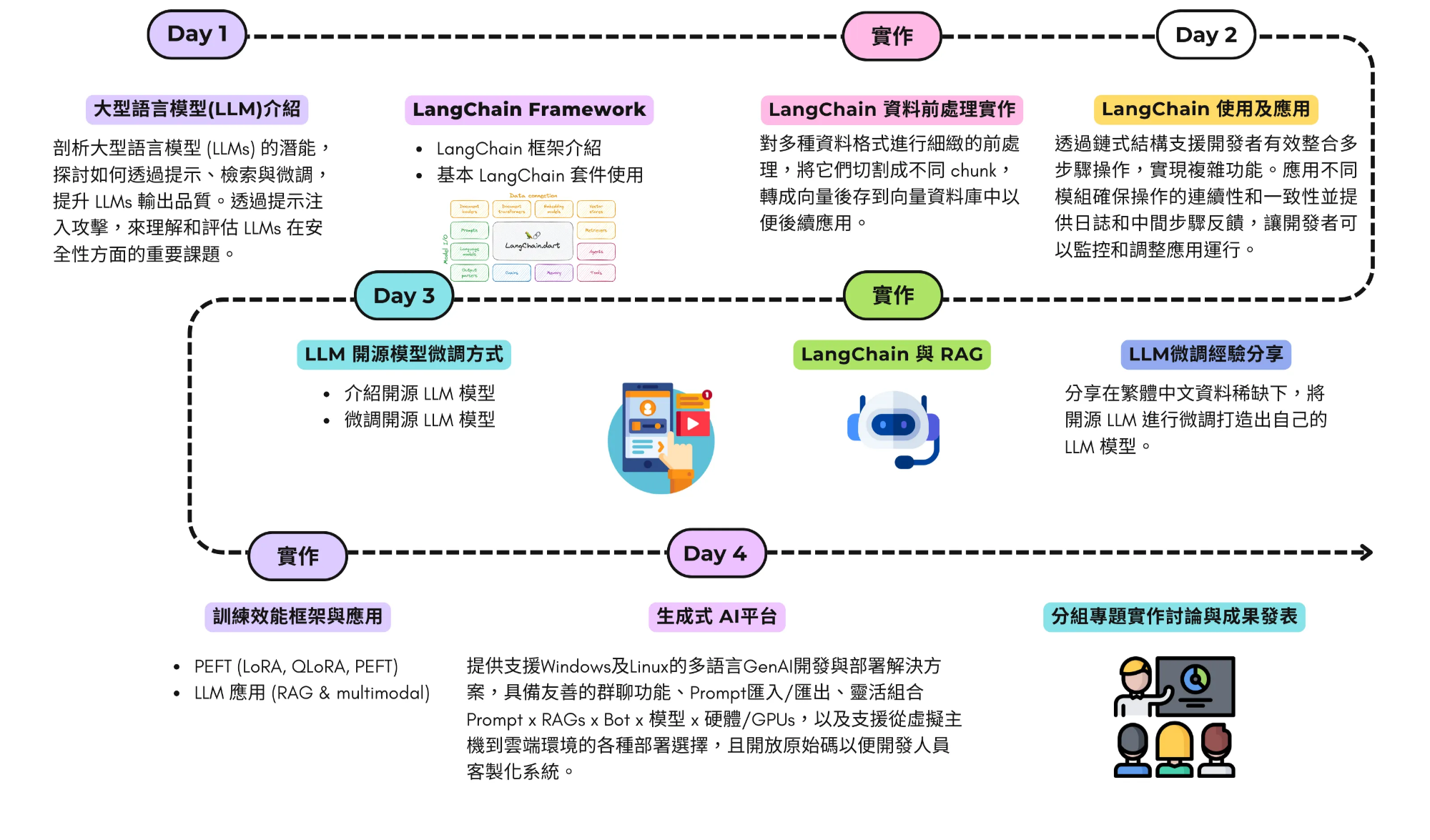
一、課程地圖
二、學員作品示例
-
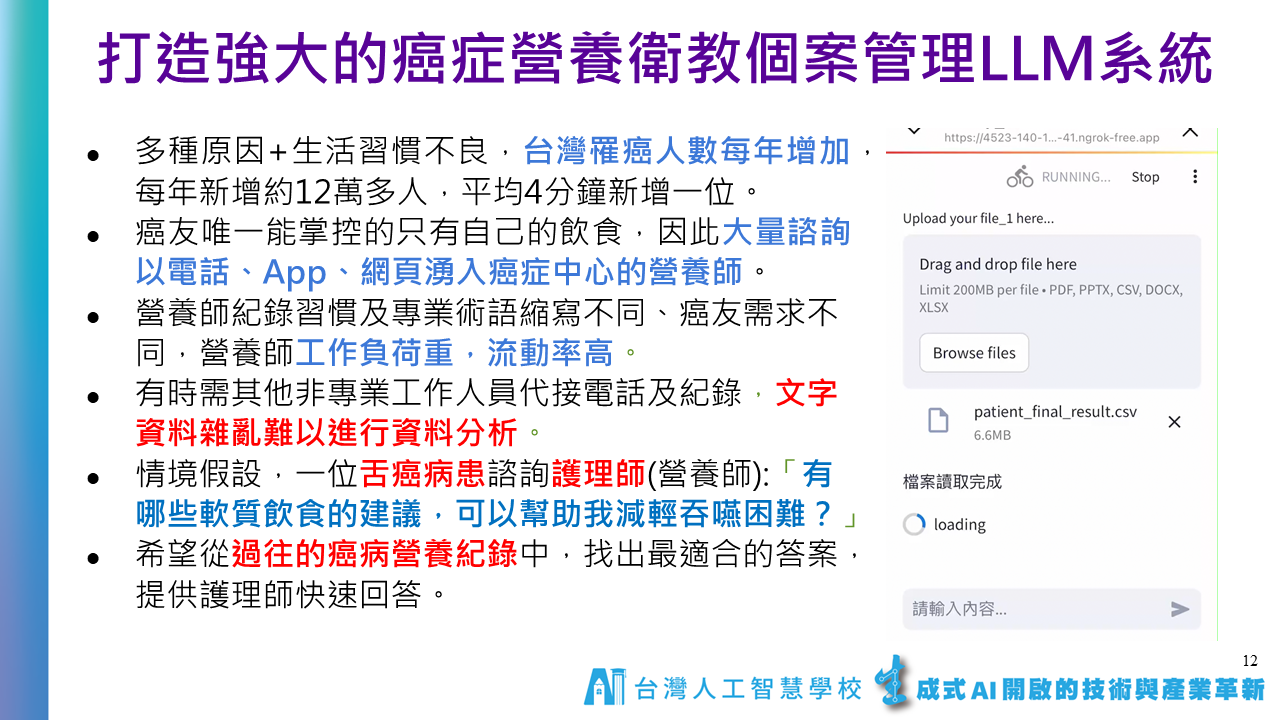
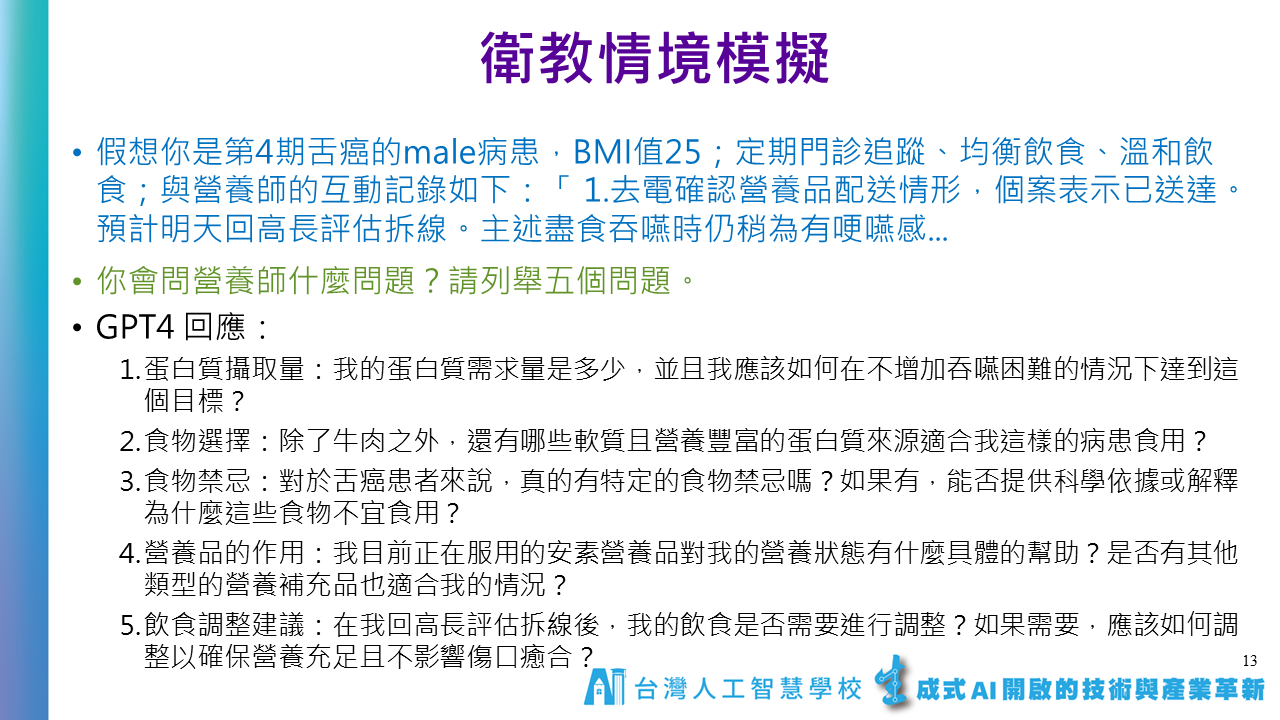
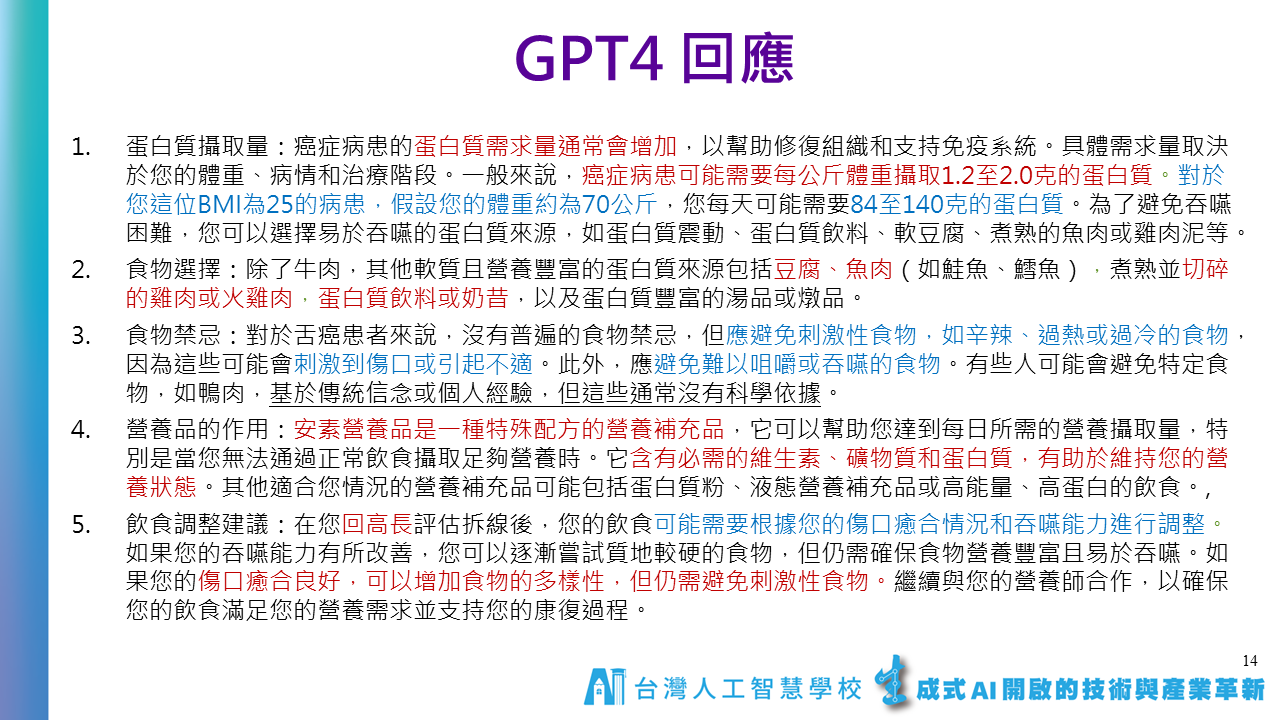
癌症營養師衛教系統

-
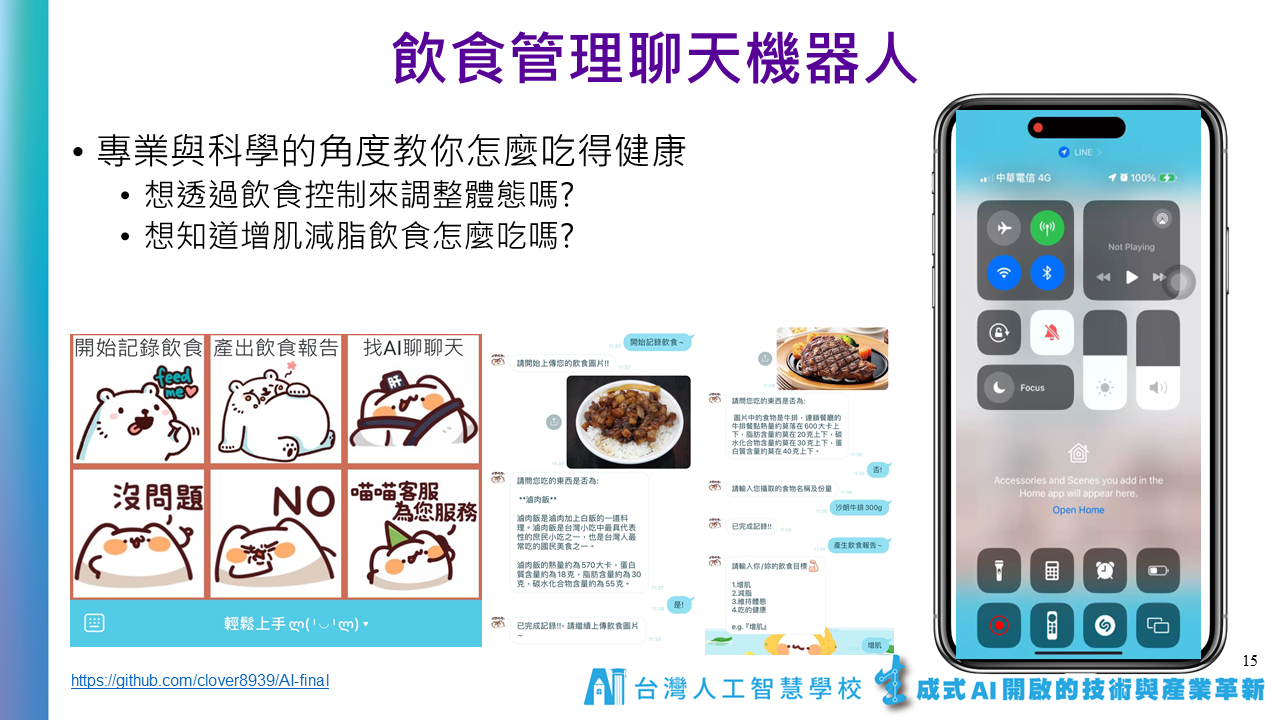
飲食聊天機器人
三、課程資料
-
Day1 & Day 2 LangChain & RAG
LangChain Notes
Chat Prompt Template & Chat Prompt-1
Chat Prompt Template & Chat Prompt-2
Partial Variables in Prompt Template-1
-
Day3 Fine-tuning
請大家在上課前先撥空註冊以下帳號與授權:
1.Huggingface帳號: 建議用google e-mail註冊 (https://huggingface.co/)。
2.Meta Llama 模型下載授權: 請使用跟huggingface同一個e-mail註冊 (https://llama.meta.com/llama-downloads) *能勾的版本都勾選(Llama 2, 3, 3.1, 3.2版),一次申請全部。
3.Google Gemma申請: (https://www.kaggle.com/models/google/gemma/)
[參考書] 公開的版本
(復旦大學) 大规模语言模型:从理论到实践 (https://intro-llm.github.io/)。
(LLM pdf下載) https://github.com/intro-llm/intro-llm.github.io
-
各種 LLMs 微調方法及範例程式 https://docs.unsloth.ai/basics/tutorials-how-to-fine-tune-and-run-llms
-
大型語言模型微調UI介面:LLaMA-Factory
-
Miniconda 安裝
下載網址:https://docs.anaconda.com/miniconda/#miniconda-latest-installer-links
-
Windows
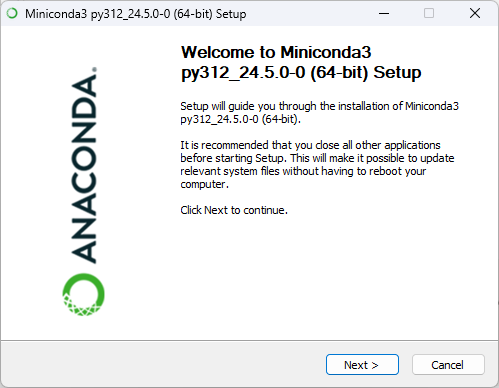
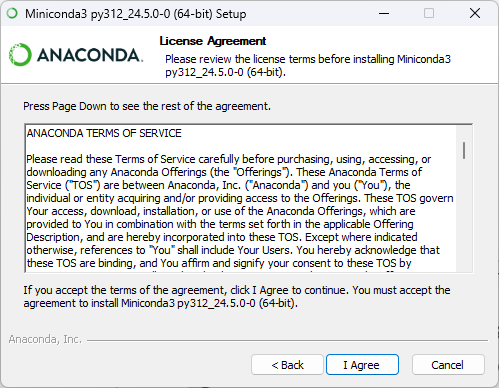
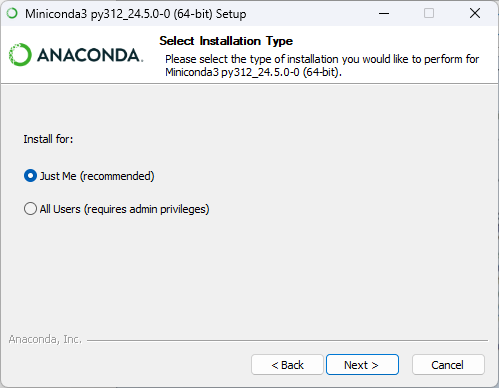
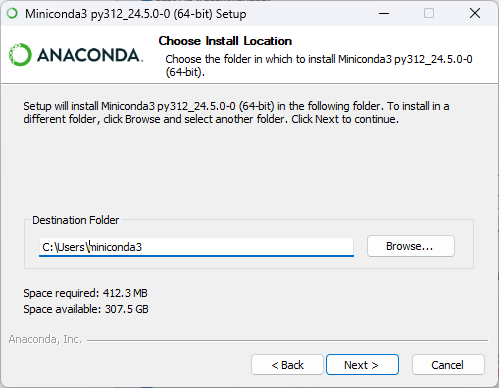
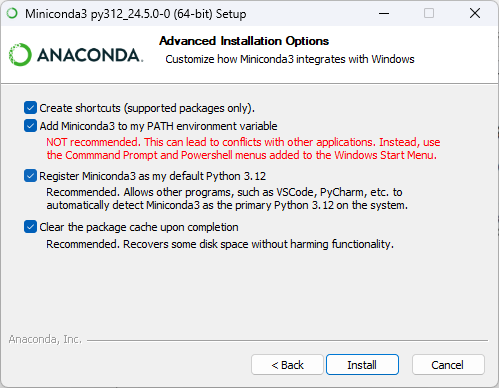
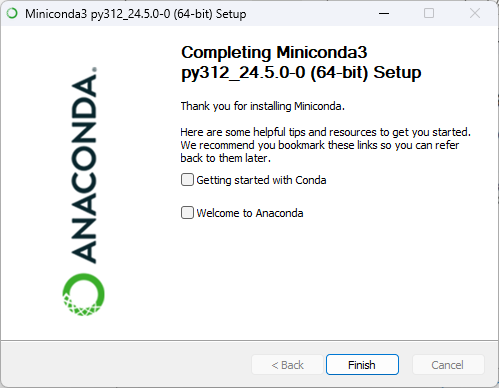
安裝流程:Next → I Agree → 個人用點 Next → 預設路徑點 Next →全部勾選後點 Next →等待安裝完成後點 Next→ 點Finish
-
Linux
下載 Miniconda3-latest-Linux-x86_64.sh
wget https://repo.anaconda.com/miniconda/Miniconda3-latest-Linux-x86_64.sh
sha256sum Miniconda3-latest-Linux-x86_64.sh
bash Miniconda3-latest-Linux-x86_64.sh
-
-
安裝LLaMA-Factory
https://github.com/hiyouga/LLaMA-Factory
# 建立 conda 指定 Python 版本
conda create -n LLaMA-Factory python=3.12
conda activate LLaMA-Factory
git clone --depth 1 https://github.com/hiyouga/LLaMA-Factory.git
cd LLaMA-Factory
pip install -e ".[torch,metrics]"
pip install https://github.com/jllllll/bitsandbytes-windows-webui/releases/download/wheels/bitsandbytes-0.41.2.post2-py3-none-win_amd64.whl# OSError: [WinError 126] 找不到指定的模組。 Error loading "~\LLaMA-Factory\Lib\site-packages\torch\lib\fbgemm.dll" or one of its dependencies.
# 改安裝torch 2.3.0 版
pip install torch==2.3.0 torchvision==0.18.0 torchaudio==2.3.0如果有 GPU 需要加速請安裝 Cuda 12.1以上及相關套件
# cuda 12.1
# cuda 下載網址: https://developer.nvidia.com/cuda-12-1-0-download-archive
pip install torch==2.3.0 torchvision==0.18.0 torchaudio==2.3.0 --index-url https://download.pytorch.org/whl/cu121

# cuda 12.4
# cuda 下載網址: https://developer.nvidia.com/cuda-12-4-0-download-archive
pip install torch==2.3.0 torchvision==0.18.0 torchaudio==2.3.0 --index-url https://download.pytorch.org/whl/cu124
介面繁體中文化,將下面檔案覆蓋後即可繁體中文化
路徑: ~\LLaMA-Factory\src\llamafactory\webui
開啟微調介面
llamafactory-cli webui
-
-
LLM 推論 vRAM 評估器 https://apxml.com/tools/vram-calculator
-
-
Day4 平台應用
補充:
探索 DeepSeek Model-Related Papers
作者有系統整理 DeepSeek 相關論文,涵蓋 DeepSeek LLM、DeepSeek-V2(專家混合模型)、DeepSeek-VL(視覺-語言理解)與 DeepSeek-Math(數學推理) 等關鍵技術。這些研究展現 DeepSeek 在 AI 領域的創新發展,並為業界與學術界提供深入分析。
‣
About: 陳伶志博士, 台灣人工智慧學校執行長。他擁有豐富的學術與實務經驗,任職中央研究院資訊科學研究所研究員、資訊服務處處長,並積極參與政府與學術機構的 AI 相關諮詢工作
停止使用RAG,改用CAG吧!🚫 中研院資訊所 黃瀚萱 助研究員跟政大資科合作的論文!🌟
-
中研院會議紀錄系統 & FAQ 系統
‣
AS-AIGC / TranscriptHub: https://github.com/AS-AIGC/TranscriptHub AS-FAQ-Web-ChatBot: https://github.com/AS-AIGC/AS-FAQ-Bot/tree/main/AS-FAQ-Web-ChatBot AS-FAQ-RAG:https://github.com/AS-AIGC/AS-FAQ-Bot/tree/main/AS-FAQ-RAG 聯發科開源台灣語料微調語言模型 Llama-Breeze2-8B-Instruct: https://ollama.com/willqiu/Llama-Breeze2-8B-Instruct 聯發科中英夾雜語音轉文字模型 Breeze-ASR-25: https://huggingface.co/MediaTek-Research/Breeze-ASR-25
中研院會議記錄系統安裝流程 劉智漢博士錄的教學影片,請參考YT連結:https://youtu.be/3s5xYsaqebU
-
Google Cloud 釋出的生成式 AI 應用
2025 年 AI 商業趨勢 https://services.google.com/fh/files/misc/google_cloud_ai_trends_zh-tw.pdf
2025 年 AI 趨勢 – 零售業與民生消費用品業 https://services.google.com/fh/files/misc/2025_ai_trends_retail_zh-tw.pdf
2025 年 AI 趨勢 – 製造業與汽車業 https://services.google.com/fh/files/misc/2025_ai_trends_manufacturing_zh-tw.pdf
2025 年 AI 趨勢 – 電信業 https://services.google.com/fh/files/misc/2025_ai_trends_telco_zh-tw.pdf
2025 年 AI 趨勢 – 媒體與娛樂業 https://services.google.com/fh/files/misc/2025_ai_trends_media_entertainment_zh-tw.pdf
2025 年 AI 趨勢 – 公部門 https://services.google.com/fh/files/misc/2025_ai_trends_public_sector_zh-tw.pdf
2025 年 AI 趨勢 – 客戶體驗 https://services.google.com/fh/files/misc/2025_ai_trends_cx_zh-tw.pdf
2025 年 AI 趨勢 – 金融服務業 https://services.google.com/fh/files/misc/2025_ai_trends_finance_zh-tw.pdf
2025 年 AI 趨勢 – 醫療照護與生命科學業 https://services.google.com/fh/files/misc/2025_ai_trends_healthcare_life_sciences_zh-tw.pdf
-
從 DeepSeek-V3 到 Kimi K2 的 LLM 架構 https://magazine.sebastianraschka.com/p/the-big-llm-architecture-comparison
-
OpenAI 推出六年來首款開源權重模型 gpt-oss
最新消息: OpenAI 發表了自 2019 年的 GPT-2 以來,首款可公開取得權重的模型。gpt-oss 系列包含兩款專為代理應用設計的混合專家模型 (MoE):gpt-oss-120b 和 gpt-oss-20b,兩者皆可免費使用與修改。
- 輸入/輸出: 模型可處理最多 128,000 個 token 的文字輸入,並生成最多 33,000 個 token 的文字輸出。
- 模型架構:
- gpt-oss-120b: 採用混合專家(MoE)的 Transformer 架構,總參數為 1170 億,每個 token 啟用 51 億個參數。
- gpt-oss-20b: 同樣為混合專家(MoE)的 Transformer 架構,總參數為 210 億,每個 token 啟用 36 億個參數。
- 效能表現: 整體表現優於 o3-mini,但落後於 o3 及 o4-mini。
- 取得方式: 提供免費的網頁版試用,其模型權重採用 Apache 2.0 授權,可供商業及非商業用途。
- 模型特色:
- 可調整的「思維鏈」(Chain-of-Thought)推理等級(高、中、低)。
- 可完整存取模型的推理過程。
- 支援工具使用。
- 未公開資訊: 訓練資料和方法的細節。
運作方式: 開發團隊運用了數兆個包含一般知識、程式設計、數學及科學等領域的 token 來預訓練 gpt-oss 模型,並在微調階段專注於強化其推理與工具使用的能力。
為了提升運作效率,團隊將混合專家模型層(MoE layers)中的權重量化,讓每個參數僅使用 4.25 位元。由於模型中超過九成的參數都位於 MoE 層,此舉讓 gpt-oss-120b 能在配備 80 GB 記憶體的 GPU 上運行,而 gpt-oss-20b 則僅需 16 GB 的記憶體即可運行。
開發團隊透過監督式微調及強化學習來訓練模型生成「思維鏈」,此方法與微調 OpenAI o3 的技術相似。 在微調過程中,他們藉由在提示中加入「Reasoning:low」等詞彙,讓模型學會支援三種不同的推理等級。
此外,模型也被微調到能夠搜尋網路、執行 Python 程式碼及使用多種工具。 團隊也訓練模型拒絕處理仇恨言論、犯罪指引、危險物質配方等不當請求。在內部針對風險行為的測試中,經過生物學與網路安全微調的 gpt-oss-120b,在這兩個領域的能力仍未達到「高能力」的門檻。
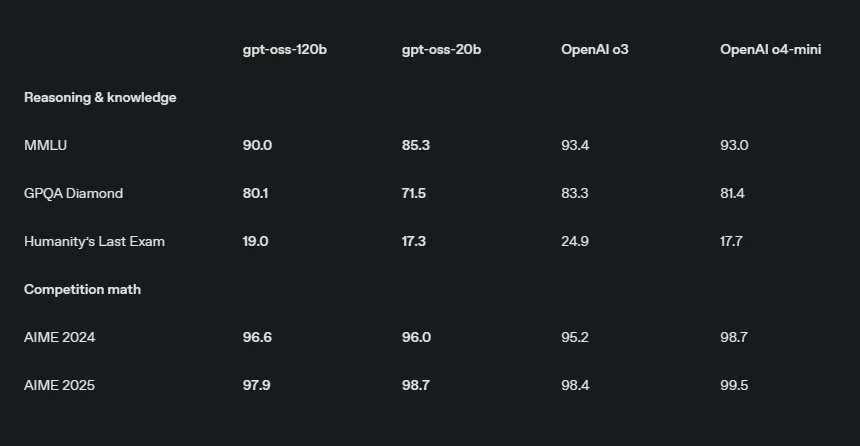
測試結果: 在 OpenAI 的測試中,當設定為高等級推理時,gpt-oss 模型的表現普遍介於 o3-mini、o3 與 o4-mini 之間。 除非另有註明,以下 OpenAI 的測試結果皆來自其官方報告,而 DeepSeek R1 的結果則源於其最新模型更新的報告。
- 在 2024 年的美國數學邀請賽(AIME)中,利用工具解決數學競賽問題時,gpt-oss-120b(準確率 96.6%)和 gpt-oss-20b(準確率 96%)的表現超越了 o3(95.2%),但仍落後於 o4-mini(98.7%)。
- 在不使用工具的情況下回答 GPQA Diamond 科學問題時,gpt-oss-120b(準確率 80.1%)的表現優於 o3-mini(77%),但遜於 o3(83.3%)及 o4-mini(81.4%)。較小的 gpt-oss-20b(71.5%)在 OpenAI 展示的模型中則敬陪末座。根據 Artificial Analysis 的分析,這也讓 gpt-oss 的表現落後於 Grok 4(87.7%)、Gemini 2.5 Pro(84.4%)及 DeepSeek R1 的最新更新版本(81.3%)。
- 在測試代理工具使用的 Tau-Bench 零售項目中,gpt-oss-120b(準確率 67.8%)的成績高於 o3(65.6%),但低於 o4-mini(70.4%)。這些模型皆優於 DeepSeek R1(63.9%)。相較之下,gpt-oss-20b 的準確率(54.8%)則明顯偏低。
-
Google Senior Engineer released a free 400+ page guide on agentic design patterns
https://github.com/Mathews-Tom/Agentic-Design-Patterns?tab=readme-ov-file
-
聯發科 Breeze 全家桶
Llama-Breeze2-8B-Instruct(LLM): https://huggingface.co/MediaTek-Research/Llama-Breeze2-8B-Instruct
Breeze-ASR-25(STT): https://huggingface.co/MediaTek-Research/Breeze-ASR-25
**BreezyVoice(TTS):** https://github.com/mtkresearch/BreezyVoice
四、 其他補充
-
如何取得 OpenAI API key?
- 進入下面網址 https://openai.com/blog/openai-api
- 點右上角 Log in 登入
- 選擇右邊的API
- 點左側欄位的齒輪 Settings -> Billings -> Payment methods -> 輸入信用卡(每月底結帳) -> 上排 Preferences -> 輸入收帳單的e-mail及地址
- 點左側欄位的齒輪 Settings -> Limits -> 設定每月預算多少美金
- 點左側欄位的鎖頭 API keys -> Create new secret key -> 自行取一個名字 -> Create secret key 6.1 如果要特別設定那些功能開啟可在 Permissions -> Restricted -> 設定那些功能要寫或讀
- 複製 API key 後按 Done
- API key不再使用可點垃圾桶刪除
-
OpenAI、Google、Anthropic 已經發佈了多種 AI 指南,包含:Prompt、AI Agents 等相關內容
- Prompt
- AI Agents
- OpenAI:A practical guide to building agents
- Anthropic:Building Effective Agents
- Google:Agents Companion
- AI 應用案例
為推動知識共享與資源應用,本文件內容採開源方式公開,提供大眾自由參考、複製與修改使用。
若您有需要,可依實際情況進行調整與引用。
請於使用或轉載時註明來源:
財團法人台灣人工智慧學校基金會
感謝大家的支持與推廣,讓知識得以持續傳遞與發揚。
聯絡信箱:hi@aiacademy.tw