課前安裝軟體
Day 1
-
n8n 安裝
-
Windows
-
https://nodejs.org/en/ 下載 https://nodejs.org/dist/v20.18.0/node-v20.18.0-x64.msi 安裝檔進行安裝
-
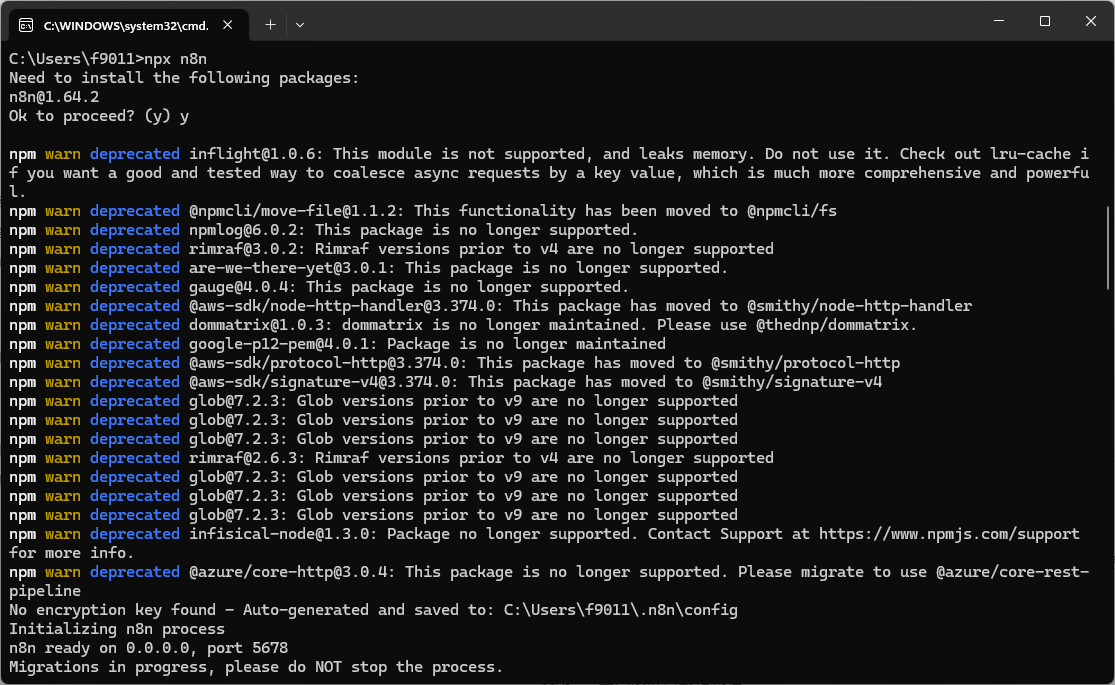
Windows 按開始或放大鏡輸入 cmd 打開命令提示字元後輸入 npx n8n 安裝n8n / Mac 在終端機輸入 npx n8n 安裝n8n
-
更新 n8n 軟體 npm update -g n8n
-
-
Mac
-
https://nodejs.org/en/ 下載 https://nodejs.org/dist/v20.18.0/node-v20.18.0-x64.msi 安裝檔進行安裝
-
打開終端機安裝 n8n
npx n8n -
開啟 n8n
n8n 啟動 n8n
-
-
Kubernetes
-
Windows
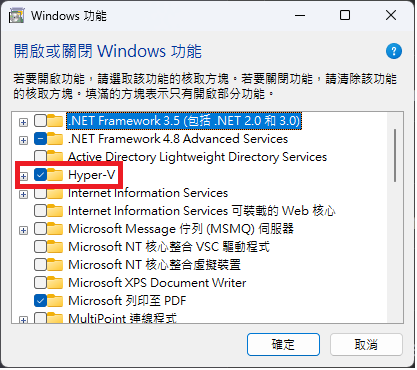
安裝順序:開啟Hyper-V →重新開機 → kubectl → minikube → n8n
-
開啟 Hyper-V
-
安裝 kubectl:
curl.exe -LO "https://dl.k8s.io/release/v1.33.0/bin/windows/amd64/kubectl.exe"
-
顯示安裝版本資訊:
kubectl version --client
-
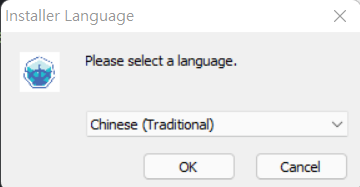
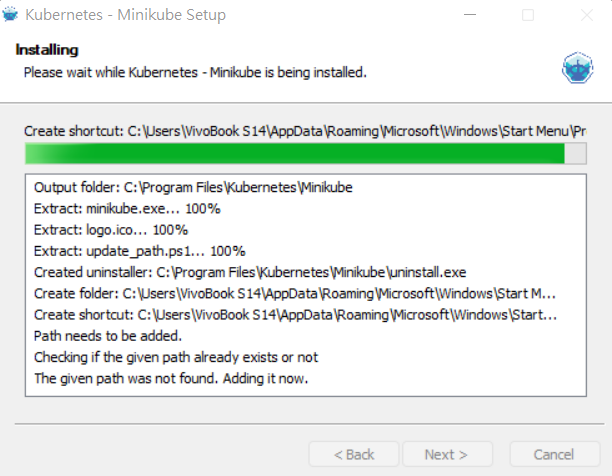
安裝 minikube:到https://github.com/kubernetes/minikube/releases 去下載 minikube-installer.exe 並執行安裝
-
啟動 minikube
minikube start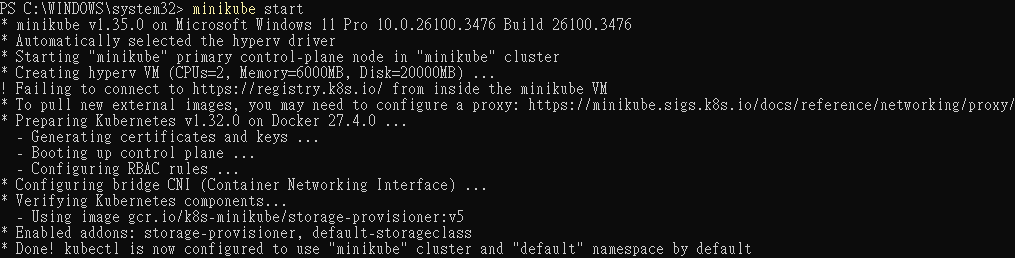
-
運行 minikube dashboard
minikube dashboard
打開 dashboard 指定網址
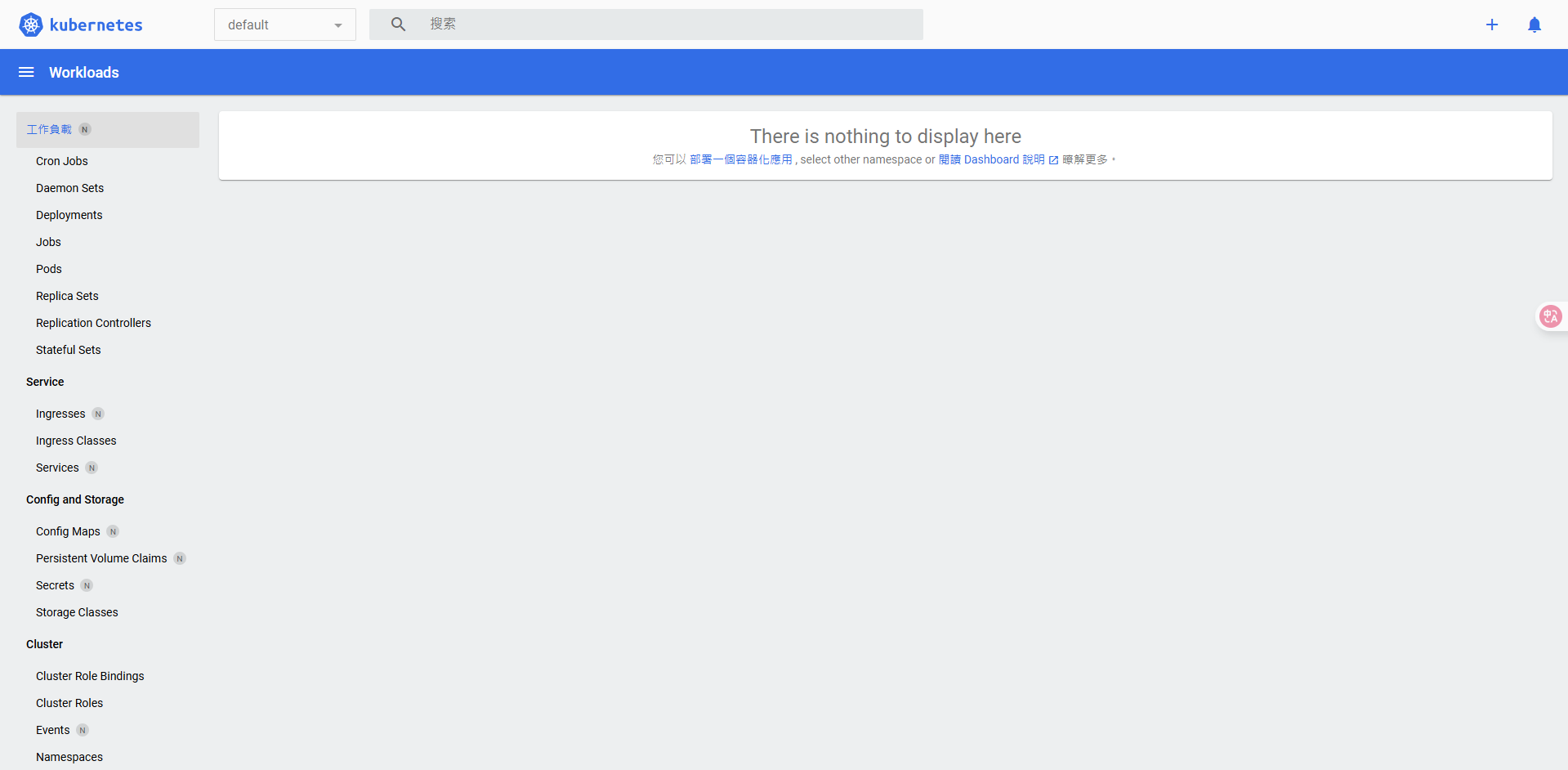
-
使用 kubectl 指令可查看當前 cluster 資訊
kubectl cluster-info
-
建立 n8n 部署與服務:
kubectl create deployment n8n --image=n8nio/n8n
kubectl expose deployment n8n --type=NodePort --port=5678 -
設定 n8n 環境變數:
kubectl set env deployment/n8n N8N_SECURE_COOKIE=false -
自動設定 n8n 服務 url 的 IP 與 Port:
kubectl get svc n8n -o jsonpath='{.spec.ports[0].nodePort}' -
查看 n8n 服務 url:
minikube service n8n --url
-
-
-
Docker
Docker 的收費條件與規則主要圍繞其產品和服務的訂閱方案,尤其是 Docker Desktop 的商業使用。
以下是主要的收費條件與規則:
1. Docker Desktop 的商業使用限制:
- 免費條件: Docker Desktop 對於個人使用、教育用途、非商業開源專案以及符合以下條件的小型企業保持免費:員工少於 250 人且年收入低於 1,000 萬美元。
- 收費條件: 如果您的公司員工人數超過 250 人或年收入超過 1,000 萬美元,則商業使用 Docker Desktop 需要付費訂閱(Pro、Team 或 Business)。政府機構使用 Docker Desktop 也需要付費訂閱。
- 按使用者計費: Docker 訂閱是按使用者計費的,這意味著如果一個使用者有多台機器,他們只需要一個授權即可在其所有機器上使用 Docker Desktop。即使開發人員不使用 Docker Desktop 的圖形介面,只要公司符合收費條件,仍然需要為該使用者支付訂閱費用。
2. Docker Engine 與 Docker CLI:
- 免費: Docker Engine 和 Docker CLI (命令列介面) 這些核心組件是開源的,並且可以免費用於個人和商業用途。您可以在 Linux 伺服器或自己的基礎設施上運行 Docker 容器,而無需支付授權費用。
3. Docker 訂閱方案: Docker 提供多種訂閱方案,包含不同的功能、使用限制和費用:
- Personal (個人版):
- 免費。
- 包含 Docker Desktop,無限公共 Docker Hub 儲存庫,每 6 小時 200 次映像檔提取,Docker Engine + Kubernetes,3 個啟用 Scout 的儲存庫,以及本地 Scout 分析。
- 主要適用於剛開始使用容器的新開發人員和/或學生。
- Pro (專業版):
- 按用戶/月收費(年度方案 $9/月,月度方案 $11/月)。
- 包含個人版的所有功能,以及無限的私有 Docker Hub 儲存庫,每天 5,000 次映像檔提取,5 個並行構建,同步檔案分享,Docker Debug,本地 Scout 分析和修復,以及 5 天支援回應時間。
- 適用於需要更進階功能和額外資源的個人專業開發人員。
- Team (團隊版):
- 按用戶/月收費(年度方案 $15/月,月度方案 $16/月)。
- 包含專業版的所有功能,以及最多 100 個使用者限制 (Team 方案上限曾調整為100位使用者,要求人數更多的組織使用更高層級的訂閱方案),無限的團隊,15 個並行構建,批量新增使用者,稽核日誌,基於角色的存取控制,以及 2 天支援回應時間。
- 適用於需要協作和提高敏捷性的開發團隊。
- Business (企業版):
- 按用戶/月收費(年度方案 $24/月)。
- 包含團隊版的所有功能,以及強化版 Docker Desktop,單點登入 (SSO),SCIM 使用者佈建,映像和註冊表存取管理,桌面洞察儀表板,增強型容器隔離 (ECI),以及優先案例路由和 24 小時支援回應。
- 適用於需要強大安全、控制和合規性功能的企業。
4. 附加服務與價格調整:
- Docker 持續將 Docker Desktop、Docker Hub、Docker Build Cloud、Docker Scout 和 Testcontainers Cloud 等工具整合到單一訂閱方案中,以提供更多資源和靈活性。
- 隨著新功能的增加,Docker 也會調整價格。例如,Docker Pro 和 Docker Team 方案的價格曾有大幅上漲,並引入了基於使用量的定價模式。
- 一些服務(如 Docker Build Cloud 的建置分鐘數、Testcontainers Cloud 執行時間、Docker Scout 儲存庫)在訂閱方案中包含一定額度,超出部分可能需要額外付費。
- Docker Hub 也添加了對映像檔擷取和存取限制,並細分了消費價格結構。
5. 最低訂購量 (MOQ) 政策:
- 對於新的 Docker Business 或 Team 年度客戶,通常需要最低購買 25 個席位。
- 對於現有的 Docker Business 或 Team 年度協議修訂,通常需要至少購買 10 個額外席位。
總之,Docker 的收費政策主要針對其整合開發環境 Docker Desktop 的商業使用,以及企業級功能和更高使用限額的訂閱服務。核心的 Docker Engine 仍是免費開源的。企業在規劃使用 Docker 時,應仔細評估其規模、團隊需求以及所需功能,以選擇最符合規範和成本效益的訂閱方案。
-
基本安裝
docker volume create n8n_data
docker run -it --name n8n -p 5678:5678 -v n8n_data:/home/node/.n8n docker.n8n.io/n8nio/n8n -
n8n 更新
docker pull [docker.n8n.io/n8nio/n8n](http://docker.n8n.io/n8nio/n8n) -
設定時區,預設式 America/New_York 改為 Asia/Taipei
-
請根據自己的帳號修改:<你的用戶名>
docker run -it --rm --name n8n -p 5678:5678 -v n8n_data:/home/node/.n8n -v /c/Users/<你的用戶名>/Downloads:/home/node/downloads -e GENERIC_TIMEZONE="Asia/Taipei" -e TZ="Asia/Taipei" docker.n8n.io/n8nio/n8n -
-rm:在容器停止後自動移除容器。 -
-name n8n:命名容器為n8n。 -
p 5678:5678:將主機的 5678 端口映射到容器的 5678 端口。 -
v n8n_data:/home/node/.n8n:將名為n8n_data的 Docker 卷掛載到容器內的/home/node/.n8n路徑。 -
e GENERIC_TIMEZONE="Asia/Taipei"和e TZ="Asia/Taipei":設置容器的時區為台北時間。 -
docker.n8n.io/n8nio/n8n:使用 n8n 的 Docker 映像。 -
將 Windows 下載資料夾掛載到 Docker 容器中的
/home/node/downloads
-
-
-
Ollama
-
Taide / Taiwan LLM / Breeze 地端語言模型 https://ollama.com/search model
# Google Gemma-3 4b
ollama run gemma3:4b

# MKT breeze
ollama run ycchen/breeze-7b-instruct-v1_0

# Taide 模型
ollama run adsfaaron/llama3-taide-lx-8b-chat-alpha:q5_k_m

# Taiwan LLM
ollama run wangrongsheng/taiwanllm-7b-v2.1-chat -
測試安裝成功網址:http://localhost:11434
-
-
FFmpeg
https://vocus.cc/article/64701a2cfd897800014daed0
https://youtu.be/ERee4DY2LQ8?si=_Pi6rBNS4YPugF0q
下載網站:https://www.ffmpeg.org/download.html
Windows 進去點 Windows builds from gyan.dev 後下載 https://www.gyan.dev/ffmpeg/builds/ffmpeg-git-essentials.7z


Mac 下載 ZIP檔點兩下安裝
【小編教室】Mac 上用 ffmpeg 快速壓縮、轉檔影片,與線上指令產生器 | 夏木樂網頁設計


Day 2
-
NocoDB
- 頁面:NocoDB
- 請下載相對應檔案名稱安裝:
-
Windows:
Noco-win-x64.exe -
Mac (M系列晶片):
Noco-macos-arm64Binaries are only for quick testing locally.
Install Method Command to install 🍏 MacOS arm64(Binary) curl http://get.nocodb.com/macos-arm64 -o nocodb -L && chmod +x nocodb && ./nocodb🍏 MacOS x64(Binary) curl http://get.nocodb.com/macos-x64 -o nocodb -L && chmod +x nocodb && ./nocodb -
測試安裝成功網址:http://localhost:8080/dashboard
-
Qdrant
前提:需安裝Nodejs
下載安裝包 https://github.com/qdrant/qdrant/releases
Windows:‣
解壓縮後執行 qdrant.exe
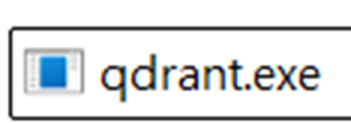
-
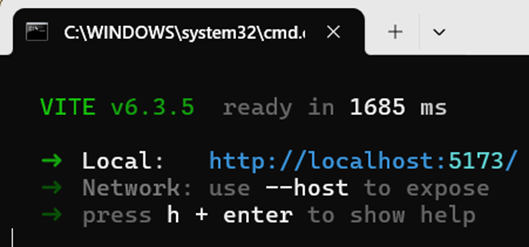
執行 exe ,成功後如右圖
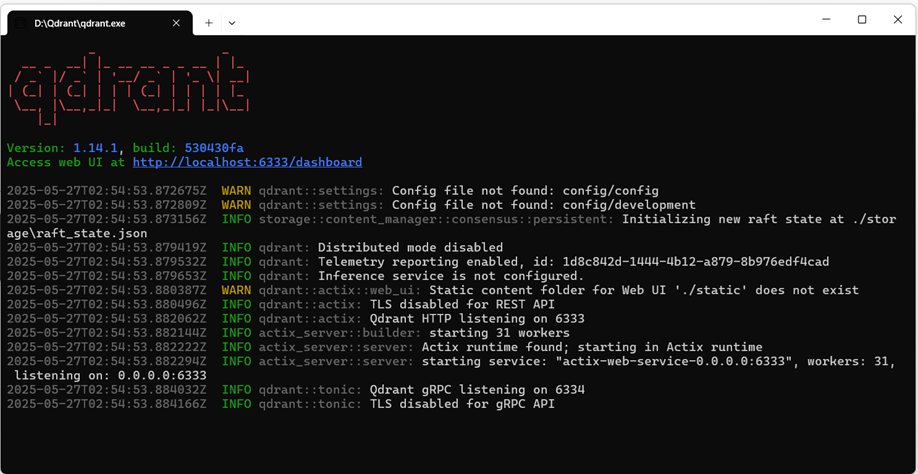
-
UI 介面安裝:https://github.com/qdrant/qdrant-web-ui
-
使用 git clone 或是直接下載 ZIP 解壓縮
-
在下載的資料夾中,執行 :
-
安裝 : npm install
-
啟動 : npm start
-
-
-
PostgreSQL
-
Windows
https://youtu.be/0eDXpNzAjV4?si=adyDX3s3w4Wf9sLe
-
下載頁面:PostgreSQL (含 pgAdmin)
-
UI 互動介面 pgAdmin (安裝檔內)
- 下載頁面:pgAdmin
- 開啟 pgAdmin 確認是否資料庫安裝成功
-
pgvector
https://github.com/pgvector/pgvector
安裝教學影片:https://youtu.be/0eDXpNzAjV4?si=adyDX3s3w4Wf9sLe
Ensure C++ support in Visual Studio is installed, and run:
選擇「使用 C++ 的桌面開發」,在右側面板中僅需勾選以下組件
開啟 cmd (需要系統管理員權限) 執行以下步驟
call "C:\Program Files\Microsoft Visual Studio\2022\Community\VC\Auxiliary\Build\vcvars64.bat"Note: The exact path will vary depending on your Visual Studio version and edition Then use
nmaketo build:set "PGROOT=C:\Program Files\PostgreSQL\17"cd %TEMP%
git clone --branch v0.8.0 https://github.com/pgvector/pgvector.git
cd pgvector
nmake /F Makefile.win
nmake /F Makefile.win install
-
-
MacOS
- 下載頁面:PostgreSQL (含 pgAdmin)
cd /tmp
git clone --branch v0.8.0 https://github.com/pgvector/pgvector.git
cd pgvector
export PATH="/Library/PostgreSQL/17/bin:$PATH"
make OPTFLAGS=""
sudo make install -
建立並測試向量資料庫
開啟 pgAdmin4,登入安裝時選擇的伺服器,並填入註冊密碼
自動開啟 SQL shell,輸入以下指令
Enable the extension (do this once in each database where you want to use it)
CREATE EXTENSION vector;Create a vector column with 3 dimensions
CREATE TABLE items (id bigserial PRIMARY KEY, embedding vector(3));Insert vectors
INSERT INTO items (embedding) VALUES ('[1,2,3]'), ('[4,5,6]');Get the nearest neighbors by L2 distance
SELECT * FROM items ORDER BY embedding <-> '[3,1,2]' LIMIT 5;Also supports inner product (
<#>), cosine distance (<=>), and L1 distance (<+>)Note:
<#>returns the negative inner product since Postgres only supportsASCorder index scans on operators
-
Day 3
-
Portainer:一款圖形化容器管理工具
官方網站:https://www.portainer.io/
簡易教學:https://www.casper.tw/development/2023/10/11/portainer/
-
Self-hosted AI starter kit (by the n8n team) v1
https://github.com/coleam00/ai-agents-masterclass/tree/main/local-ai-packaged
包含套件:
✅ Self-hosted n8n - Low-code platform with over 400 integrations and advanced AI components
✅ Ollama - Cross-platform LLM platform to install and run the latest local LLMs
✅ Open WebUI - ChatGPT-like interface to privately interact with your local models and N8N agents
✅ Flowise - No/low code AI agent builder that pairs very well with n8n
✅ Qdrant - Open-source, high performance vector store with an comprehensive API
✅ PostgreSQL - Workhorse of the Data Engineering world, handles large amounts of data safely.
-
Self-hosted AI starter kit v2
https://github.com/coleam00/local-ai-packaged
包含套件:
✅ Self-hosted n8n - Low-code platform with over 400 integrations and advanced AI components
✅ Supabase - Open source database as a service - most widely used database for AI agents
✅ Ollama - Cross-platform LLM platform to install and run the latest local LLMs
✅ Open WebUI - ChatGPT-like interface to privately interact with your local models and N8N agents
✅ Flowise - No/low code AI agent builder that pairs very well with n8n
✅ Qdrant - Open source, high performance vector store with an comprehensive API. Even though you can use Supabase for RAG, this was kept unlike Postgres since it's faster than Supabase so sometimes is the better option.
✅ Neo4j - Knowledge graph engine that powers tools like GraphRAG, LightRAG, and Graphiti
✅ SearXNG - Open source, free internet metasearch engine which aggregates results from up to 229 search services. Users are neither tracked nor profiled, hence the fit with the local AI package.
✅ Caddy - Managed HTTPS/TLS for custom domains
✅ Langfuse - Open source LLM engineering platform for agent observability
補充
-
Miniconda
https://repo.anaconda.com/miniconda/
Windows:https://repo.anaconda.com/miniconda/Miniconda3-latest-Windows-x86_64.exe
Mac (M 系列):https://repo.anaconda.com/miniconda/Miniconda3-latest-MacOSX-arm64.pkg
Mac (Intel 系列):https://repo.anaconda.com/miniconda/Miniconda3-latest-MacOSX-x86_64.pkg
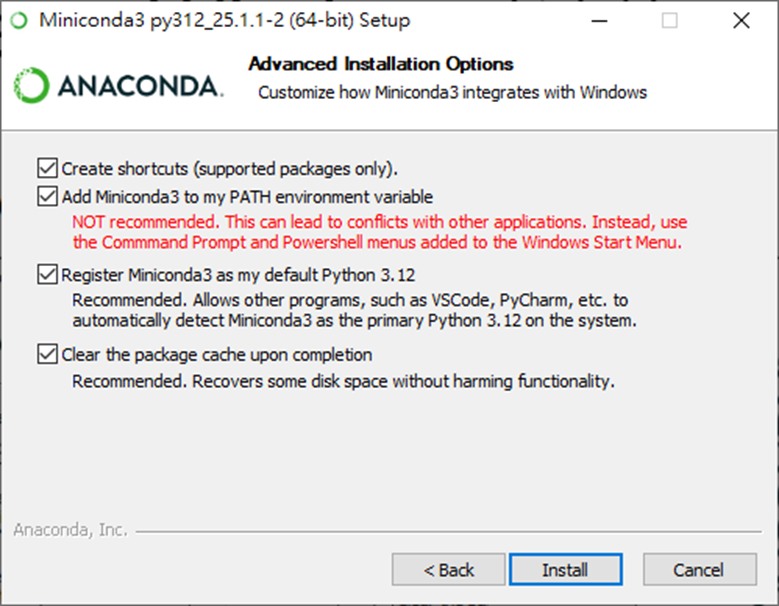
中間的某一步驟建議請全部打勾
安裝套件
Windows 搜尋 cmd (命令提示字元) 後輸入 pip install openai-whisper 安裝套件
Mac 開啟終端機輸入 pip install openai-whisper 安裝套件
-
UV
https://dev.to/codemee/shi-yong-uv-guan-li-python-huan-jing-53hg